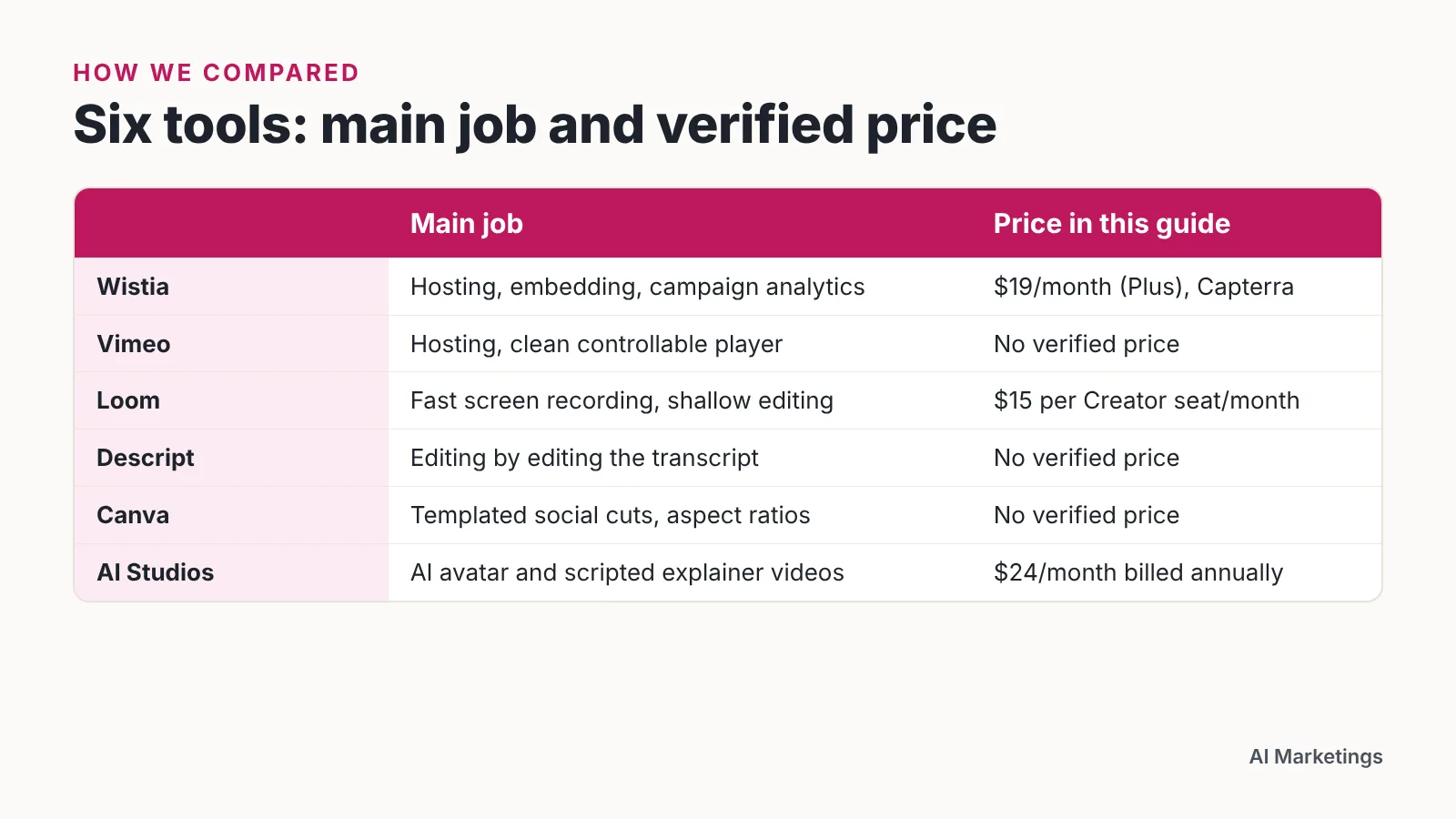
Wistia and Vimeo handle hosting plus analytics, Loom and Descript cover fast creation and editing, Canva covers templated social cuts, and AI Studios makes avatar videos. Most small teams pair one creation tool with one hosting platform.
How we compared
Video tooling splits into three jobs: making the file, hosting and embedding it, and reporting what happened after someone pressed play. Very few products do all three well. The six picks below were judged on the same five axes.
- Creation — recording, editing, templates, voiceover, localization.
- Hosting — a player you can embed on your own site or landing pages.
- Analytics — play rates, engagement over time, and whether data can reach your CRM or email tool.
- Price in comparable units — per seat per month, or per month for the lowest paid tier.
- Team fit — how much of the work one marketer can finish alone.
According to HubSpot’s State of Marketing Report 2026, 93% of marketers say video is an important part of their marketing strategy, which makes the tooling question practical rather than optional.
What was checked: published pricing pages, vendor billing documentation and third-party software directories, all cited under this article. What was not checked: no tool here was tested hands-on, no player load times were measured, and no analytics dashboards were compared side by side. Pricing for Vimeo, Descript and Canva is left blank on purpose — no verified source was available at publication, so check their pricing pages before you commit.
| Tool | Creation | Hosting + analytics | Verified price unit | Best for |
|---|---|---|---|---|
| Wistia | Basic recording and editing | Yes, built for marketing sites | $19/mo Plus, $79/mo Pro, $319/mo Advanced; free plan capped at 10 videos (Capterra) | Site-embedded video with engagement data |
| Vimeo | Editing and sharing workflow | Yes, player-first | Not verified for this guide | Clean, ad-free playback of finished work |
| Loom | Screen and camera recording | Shareable links, viewer-level signals | $15 per Creator seat/month (Loom billing docs) | Async sales and support videos |
| Descript | Transcript-based editing | No marketing analytics layer | Not verified for this guide | Trimming filler and repurposing long recordings |
| Canva | Template-driven social cuts | No | Not verified for this guide | Short vertical video without an editor |
| AI Studios | AI avatar video, text-to-video, dubbing | No | Free $0; Personal $24/mo billed annually | Scripted explainers in many languages |
1. Wistia
Wistia earns its place because it treats video as a marketing asset rather than a file. The player sits on your own pages, and the reporting is built around what a marketing manager actually reports upward.
Capterra’s Wistia listing records a free plan limited to 10 videos, with paid tiers at $19/month (Plus), $79/month (Pro) and $319/month (Advanced). Converted to a monthly unit, Plus is the cheapest verified entry point of any dedicated hosting platform in this guide. The jump from Pro to Advanced is large, so map your real video count before upgrading.
Wistia also publishes research on how teams use video, and its State of Video in 2026 report is based on a survey of more than 900 professionals plus platform data covering over 13 million videos and 79 million hours of viewing. That matters for a buying decision because the benchmarks inside the product come from the same data set.
Social media engagement is now the primary video success metric for 22% of teams, roughly double the previous year’s share, according to Wistia’s State of Video in 2026 — so confirm the platform reports on the channels you actually care about.
Who it fits: a marketing manager who embeds video on landing pages and needs play-rate data tied to campaigns.
Skip it if: every video you make lives and dies on social feeds and never touches your website.
2. Vimeo
Vimeo is the choice when playback quality and a distraction-free viewing page matter more than campaign attribution. Client review, portfolio pages and embedded showreels are its natural home.
The decision usually comes down to where your audience watches. LinkedIn has overtaken YouTube as the main video distribution channel for teams in Wistia’s 2026 research, with 76% of teams still posting to YouTube — meaning your hosting platform is often a second home, not the only one.
Treat that as a workflow question. If most views happen on a social platform, you need a host that makes exporting and re-cutting painless rather than one that locks assets behind a heavy publishing flow. Test that during a trial with one real video, not a sample file.
No current pricing is cited here because no verified source was available, so price it yourself against the $19/month Wistia Plus figure Capterra lists.
Who it fits: a small team that shares finished video with clients and wants a clean, controllable player.
Skip it if: your main question is which specific leads watched which video and whether that data reaches your CRM — verify that before paying.
3. Loom
Loom is built for the unpolished video that still closes deals: a screen walkthrough, a pricing explanation, a reply to a support ticket. Recording takes seconds. Editing is deliberately shallow.
Loom’s official billing documentation states that the Business plan costs $15 per Creator seat per month. Price scales with the number of people recording, not the number of videos, so a two-person sales team costs far less to equip than a ten-person one.
Loom’s free Starter plan caps users at 25 videos each with a 5-minute recording limit, 720p quality and up to 50 workspace members, according to Costbench. That combination is unusual — a lot of people can join the workspace, but each one hits a video ceiling fast. For a small business testing async video with customers, the free tier is a realistic pilot rather than a demo.
Who it fits: founders and salespeople who send explanatory videos one-to-one and need speed over polish.
Skip it if: you are producing a brand launch film that needs color grading, multi-track audio and frame-level control.
4. Descript
Descript changes the editing motion: you edit the transcript, and the video follows. For anyone who has never opened a timeline editor, that removes the single biggest barrier to publishing.
The practical use is repurposing. A 40-minute webinar recording becomes three short clips in an afternoon when you can delete filler words by deleting text. Marketing managers with no video editor on staff get the most from this.
There is a limit worth naming. Descript is an editing room, not a hosting and analytics system, so you still need somewhere to put the finished file and something to measure it with. Plan the pairing before you buy, not after.
No verified price is published here. Check the current plan page and convert it to a per-seat monthly figure so you can compare it against the $15 per Creator seat per month that Loom’s billing documentation states.
Who it fits: a one-person content team turning long recordings into short, publishable cuts.
Skip it if: your videos are mostly motion graphics or animation rather than people talking.
5. Canva
Canva solves the format problem. Vertical, square and widescreen versions of the same message, built from templates, with your brand colors applied once.
In HubSpot’s State of Marketing Report 2026, marketers named three video formats as the top ROI drivers: short-form video (49%), long-form video (29%) and live-streaming video (25%). Short-form sits squarely in Canva’s territory, which is why it belongs in a small team’s stack even if it never hosts a single file.
Use it as the last step, not the first. Record and edit elsewhere, then bring the cut into Canva for captions, end cards and the three aspect ratios you need. That sequence keeps template limitations from shaping your message.
Who it fits: a small-business owner who posts weekly social video and has no designer.
Skip it if: you need audio repair, multi-camera editing or any serious control over the final mix.
6. AI Studios (DeepBrain AI)
AI Studios is DeepBrain AI’s cloud-based platform for creating AI avatar videos, text-to-video content, and video translations. It combines avatar video creation, text-to-video, dubbing, text-to-speech and generative AI tools in a single workspace, which suits scripted explainers that need to exist in several languages.
Pricing converts cleanly. The Free plan costs $0 and allows up to 3 AI videos of up to 1 minute each, exported in 720p, with 16 one-time generative credits. The Personal plan is listed at $24 per month when billed annually, and includes unlimited AI videos up to 30 minutes each, 1080p export, 3 custom avatars, 120 minutes of AI dubbing per month and 60 generative credits per month — so the per-video cost falls as your output rises, unlike per-seat tools. Annual billing is advertised as saving 20% compared with monthly billing.
Localization is the strongest reason to look at it: text-to-speech voiceovers are available in 150+ languages and accents on paid plans, and in 30+ languages on the Free plan, with more than 1,000 AI voices across plans and voice cloning from a short voice recording. Stock avatars are listed separately at 40+ on Free, 100+ on Personal, and 155+ on Team and Enterprise. The platform was named a CES 2022 Innovation Awards Honoree and received the NAB Show 2022 Product of the Year award. Full plan details sit on the AI Studios pricing page.
The limitation is real: AI Studios offers Free, Personal, Team and Enterprise plans for video creation, and no hosting or marketing analytics, so you still need Wistia, Vimeo or a social channel underneath it. For a founder story or a customer testimonial, a real person on camera recorded in Loom will almost always land better than an avatar.
Who it fits: teams producing repeatable, scripted explainers or training clips across multiple languages.
Skip it if: the video’s credibility depends on a recognizable human face from your own company.
Which one fits you
Budget sets the shape of the stack before features do. Wistia’s State of Video in 2026 found 41% of companies spent under $20,000 on video promotion and advertising in 2025, while 28% spent over $20,000 — meaning a sizable group is working with modest budgets and needs tools that stretch.
Pick one creation tool and one hosting platform. Stacking three editors because each has a nice feature is the most common way small teams waste money.
| Your situation | Start with | Why |
|---|---|---|
| Video lives on your website and you report on engagement | Wistia | Marketing-focused analytics; $19/month Plus per Capterra |
| You share finished work with clients and want a clean player | Vimeo | Playback-first hosting; confirm current pricing yourself |
| Sales or support replies by video, one-to-one | Loom | $15 per Creator seat/month per Loom’s billing docs |
| You have long recordings and no video editor | Descript | Transcript editing makes cutting approachable |
| Weekly short-form social posts, no designer | Canva | Templates and multiple aspect ratios in one pass |
| Scripted explainers in many languages | AI Studios | 150+ languages on paid plans; $24/month billed annually |
Run each shortlist tool against one real project before you pay annually. Use a video you actually need to ship — a pricing explainer, a product update, a customer onboarding clip — and time how long it takes end to end. The tool that gets that video published is the right one, regardless of feature lists.
Revisit the stack once a year. Distribution shifts, and a hosting platform chosen for website embeds may not serve you well once most of your views arrive from a social feed.
Frequently asked questions
Do I need separate tools for creating and hosting video?
Usually yes. Creation tools like Loom, Descript and Canva do not provide a marketing analytics layer, while hosting platforms focus on the player and reporting. Loom’s Business plan costs $15 per Creator seat per month per Loom’s billing documentation, and Capterra lists Wistia Plus at $19/month, so a two-tool stack stays affordable for a small team.
What is the cheapest way to start with video marketing tools?
Stack the free tiers first. Loom’s free Starter plan caps users at 25 videos each with a 5-minute recording limit, 720p quality and up to 50 workspace members according to Costbench, Capterra records a free Wistia plan limited to 10 videos, and the AI Studios Free plan costs $0 and allows up to 3 AI videos of up to 1 minute each in 720p.
Which video metric should a small team report on?
Match the metric to where people watch. Social media engagement is now the primary video success metric for 22% of teams, roughly double the previous year’s share, according to Wistia’s State of Video in 2026, while site-embedded video is better judged by play rate and how far viewers get before dropping off.
How much do companies actually spend on video?
Wistia’s State of Video in 2026 found 41% of companies spent under $20,000 on video promotion and advertising in 2025, while 28% spent over $20,000. That report draws on a survey of more than 900 professionals plus platform data covering over 13 million videos and 79 million hours of viewing, so treat the lower band as a realistic small-team benchmark.
Are AI avatar videos good enough for customer-facing content?
They work best for scripted, repeatable material such as product explainers, onboarding and training, especially across languages — AI Studios offers text-to-speech voiceovers in 150+ languages and accents on paid plans. For founder stories, testimonials or anything where trust depends on a familiar human face, record a real person instead.
Sources
- Marketing Statistics Every Team Needs to Grow in 2026 — HubSpot
- State of Video in 2026: Video Marketing Statistics & Insights from Wistia (HubSpot Blog)
- Loom’s billing policy for paid plans — Loom Support
- Loom Pricing 2026: 4 Plans from Free–$20/user/month — Costbench
- Wistia Software Pricing, Alternatives & More 2026 — Capterra
Written with AI assistance and fact-checked against the sources cited above before the AI Marketings Editorial Team published it.