Run one social media video marketing plan by shooting a single vertical master, cutting platform-length variants, scheduling from one calendar, and judging every feed on the same three metrics.
Quick Steps
One shoot, five feeds. Run these five actions in order before you book a camera or write a caption.
- Write your core message as one sentence, then give each platform a single goal.
- Shoot vertical 9:16 only, keeping faces and props inside a center safe zone.
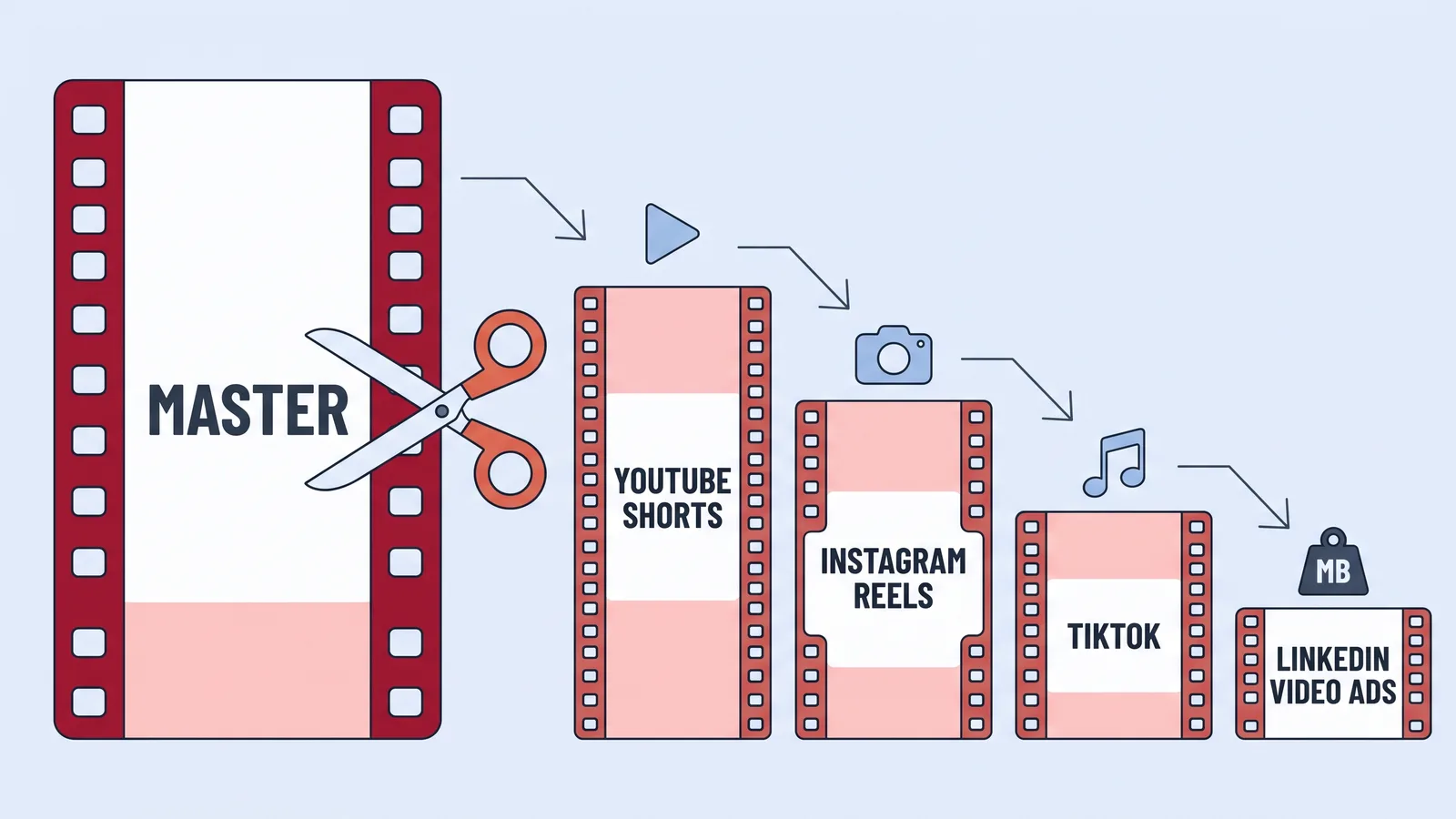
- Cut one master version, then trim shorter variants against each network’s documented limit.
- Drop every variant into one calendar with a date, an owner and a caption.
- Score all platforms on the same three metrics, then re-cut whatever won.
Each section below names the time it takes and the gear you need. Step 2 is the only one that needs a blocked-off half day; the rest fit inside a normal working week. A phone, a vertical tripod, a clip-on mic and a spreadsheet are enough to run the entire system for a quarter.
The hard part is not production. It is resisting the urge to invent a different message for every app, which is where most small teams lose their evenings.
Why One Video Plan Beats Five Separate Ones
Separate plans multiply scripting, shooting, review and approval by the number of apps you post to, while the audience barely registers the difference. Someone who sees your founder on TikTok and again on LinkedIn reads one brand, not two campaigns. Duplication costs you money and buys you nothing.
The discovery math makes the single plan worth the discipline. According to Sprout Social, TikTok, Instagram and YouTube together account for over 60% of product discovery, surpassing Google. One vertical clip can appear in all three of those places during the same week.
Cadence is the real constraint for a small team. Wistia’s State of Video research found that forty-three percent of businesses produce at least one marketing video a week, which is the pace you are competing against. Hitting that pace with five parallel production tracks is not realistic for a team of two or three.
A single plan also makes results readable. When the same message runs everywhere with the same opening three seconds, a performance gap tells you something about the platform rather than the script. If you are still deciding which formats belong in the mix, this breakdown of the main video formats and when each one earns its budget is a useful starting point.
Step 1 — Choose One Core Message and Set a Goal Per Platform
Time: 60–90 minutes. You need: this quarter’s offer, last quarter’s platform numbers, one page.
Write the message as a sentence a customer would actually say out loud. Example: "This scheduling tool cut my Monday admin from two hours to twenty minutes." If the sentence needs a comma plus an "and also," you have two messages and two shoots.
Then assign each platform one job, not three:
- TikTok — cold reach from people who have never heard of you.
- Instagram Reels — saves and shares from an audience that half-knows you.
- YouTube Shorts — subscribers and searchable shelf life.
- LinkedIn — comments from buyers and their colleagues.
- Facebook — a warm retargeting pool for paid.
Format choice follows the goal. In survey data cited by Sprout Social, only 22% of marketers said long-form video had the highest ROI and just 6% named live video, with short-form video leading — which is why the short vertical cut, not the webinar recording, is the center of this plan.
Put the message and the five goals on one page and send it to whoever approves creative. Approval before the shoot is cheap; approval after is a reshoot.
Step 2 — Shoot Once in 9:16 With Safe Zones for Every Crop
Time: half a day for three to five videos. You need: phone or camera, vertical tripod, clip-on mic, one soft light, floor tape.
Shoot everything vertically at 9:16, then protect the middle of the frame. Keep faces, hands and product inside roughly the central 60% of the height so a 1:1 or 4:5 crop still looks deliberate. Mark the spot on the floor with tape so takes match across the day.
Leave the top and bottom edges empty on purpose. Platform interfaces park profile photos, captions, buttons and music credits in those strips, and anything you place there will be covered. Burn in nothing during the shoot — titles, captions and end cards get added per platform in Step 3.
Record three different openings for every video. A hook that lands on TikTok often falls flat on LinkedIn, and reshooting one line is far cheaper than reshooting a setup; the logic behind that is covered in this guide to building a video opening that earns the first three seconds. Grab fifteen seconds of room tone and a handful of silent B-roll shots before you strike the light.

Step 3 — Cut Platform-Specific Versions Against Each Network’s Length Limits
Time: 2–3 hours per core video. You need: the master file, an editor, and the limits below.
Cut the master first — the full, tightest version of the message — then trim downward. Never stretch a short cut to fill a longer slot.
| Platform | Documented length | Source |
|---|---|---|
| YouTube Shorts | Up to three minutes | YouTube Help |
| Instagram Reels (in-app creation) | Up to 3 minutes | Social Media Today |
| Instagram Reels (record and edit) | Up to 20 minutes | Instagram Help Center |
| TikTok | Up to 10 minutes; 21–34 seconds recommended | Sprout Social |
| LinkedIn video ads | 3 seconds to 30 minutes, 75 KB–500 MB | LinkedIn Business |
YouTube Help states that YouTube Shorts can now be up to three minutes in length, and Instagram officially announced three-minute Reels, so a single vertical cut under three minutes can serve both feeds without a re-edit. LinkedIn Business specifies that video ads must run between 3 seconds and 30 minutes with a file size between 75 KB and 500 MB, which makes file weight, not runtime, the usual rejection reason there.
Captions get rebuilt per platform because each app covers a different part of the frame. For localized variants, an avatar-based tool such as AI Studios offers text-to-speech voiceovers in 150+ languages and accents on paid plans, which saves a second shoot when you need the same message in another market.
Step 4 — Schedule Everything From a Single Publishing Calendar
Time: 45 minutes to build, 20 minutes a week to run. You need: one spreadsheet or scheduler, your caption file, owner names.
One calendar, every platform, every variant. Give it these columns: publish date, platform, file name, runtime, hook line, caption, link destination, owner, status. If a row has no owner, it will not publish.
Stagger the same message rather than firing it everywhere at once. A workable sequence is TikTok on Monday, Reels on Tuesday, Shorts on Thursday, LinkedIn on the following Tuesday morning, Facebook last as retargeting fuel. Spreading the drops gives you five separate sets of comments to answer instead of one unmanageable hour.
Build the calendar four weeks out and lock the shoot days first, since those are the only entries that need other people’s diaries. Captions and links can be filled in the week before. A repeatable weekly rhythm matters more than any single post, and this weekly operating system for short-form video shows how the cadence holds up when a week goes sideways.
Step 5 — Measure With One Shared Metric Set and Recycle the Winners
Time: 30 minutes weekly. You need: native analytics for each platform, one results sheet.
Track the same three numbers everywhere, even though each dashboard names them differently: hook retention (viewers still watching after the first few seconds), average watch-through percentage, and action rate (saves, shares, comments, clicks). Platform-specific vanity metrics go in a separate column you only read quarterly.
Runtime deserves its own check. Wistia’s State of Video data found engagement barely changes between one minute and five minutes but drops sharply past five minutes, which gives you a practical ceiling when you repurpose longer footage into feed cuts.
Recycling beats reshooting. Take the top video of each month and produce three new openings against the same body, then republish across the calendar four to six weeks later. Audiences on TikTok and Reels see a fraction of your posts, so a re-cut rarely reads as a repeat.
Kill anything that lost twice. Two weak runs with different hooks means the message is wrong, not the edit, and that belongs back in Step 1.
Your One-Shoot, Multi-Platform Launch Checklist
Print this and work down it in order. Everything above is folded into these lines.
- ☐ One-sentence core message written and approved in writing
- ☐ One goal assigned per platform, with the metric that proves it
- ☐ Shoot day booked, floor tape placed, clip-on mic tested
- ☐ All footage recorded vertically at 9:16 with the center safe zone respected
- ☐ Three alternate hooks recorded for every core video
- ☐ Master cut exported before any platform variant is made
- ☐ Each variant checked against the published length and file-size limits
- ☐ Captions rebuilt per platform, nothing burned into the edges
- ☐ Every post in one calendar with a date, a caption and a named owner
- ☐ Results sheet set up with hook retention, watch-through and action rate
- ☐ Monthly winner flagged for re-cut and republishing
If you can tick nine of eleven before publish day, launch. Perfection on this checklist costs more than the two missing boxes are worth.
Common Mistakes That Break a Cross-Platform Video Plan
The most common failure is shooting horizontally and letting each app auto-crop the result. Heads get sliced, products drift out of frame, and the text you carefully centered sits under a comment button. Avoid it by shooting 9:16 from the start and keeping every important element inside the center safe zone, as in Step 2.
Identical captions across all five feeds are the second trap. The video can be the same file; the first line of text should match how people read on that platform.
Teams also publish everything within one hour, then have no capacity to answer comments on any of it. Stagger the drops across a week and the same workload becomes manageable.
The last mistake is tool sprawl — three editors, two schedulers and a separate caption app, all paid monthly. Consolidate before you expand, using something like this rundown of video tools sized for teams of one to three as a pruning list.
Frequently asked questions
Can one vertical video really work on every platform?
Mostly, yes, if you keep it under three minutes. YouTube Help documents Shorts at up to three minutes, and Social Media Today reported Instagram officially expanded Reels to three minutes, so a single cut can serve both. Captions and the opening line should still be rebuilt per platform.
How long should each platform cut be?
Start short and trim to each network. Sprout Social notes TikTok allows up to 10 minutes but recommends 21–34 seconds, while Wistia’s State of Video data found engagement barely changes between one and five minutes before dropping sharply past five minutes.
How often do I need to publish video to keep up?
Weekly is the realistic benchmark. Wistia’s State of Video research found that forty-three percent of businesses produce at least one marketing video a week. A single half-day shoot producing three to five vertical videos covers roughly a month at that cadence.
Do LinkedIn videos need a separate export?
Usually yes, for file weight rather than runtime. LinkedIn Business specifies video ads must run between 3 seconds and 30 minutes with a file size between 75 KB and 500 MB, so compress your master before uploading rather than shooting separate footage.
If I can only commit to one or two platforms, which should they be?
Pick where your buyers discover products. Sprout Social reports TikTok, Instagram and YouTube together account for over 60% of product discovery, surpassing Google, so two of those three plus one owned channel is a defensible starting setup.
Sources
- Understand three-minute YouTube Shorts – YouTube Help
- Record a reel on Instagram – Instagram Help Center
- Instagram Officially Expands Reels Length to 3 Minutes | Social Media Today
- Video Ads Specifications – LinkedIn Business
- Always up-to-date guide to social media video specs – Sprout Social
- Top 5 Insights from Wistia’s 2024 State of Video Report
- Wistia State of Video Report: Engagement Rates Down, Content Less Promoted – Chief Marketer
- Social Media ROI Statistics Marketers Need to Know – Sprout Social
- 120+ Must-know social media marketing statistics – Sprout Social
Written with AI assistance and fact-checked against the sources cited above before the AI Marketings Editorial Team published it.